

Samsung Galaxy S26 Ultra Addresses Common In-Flight Challenge

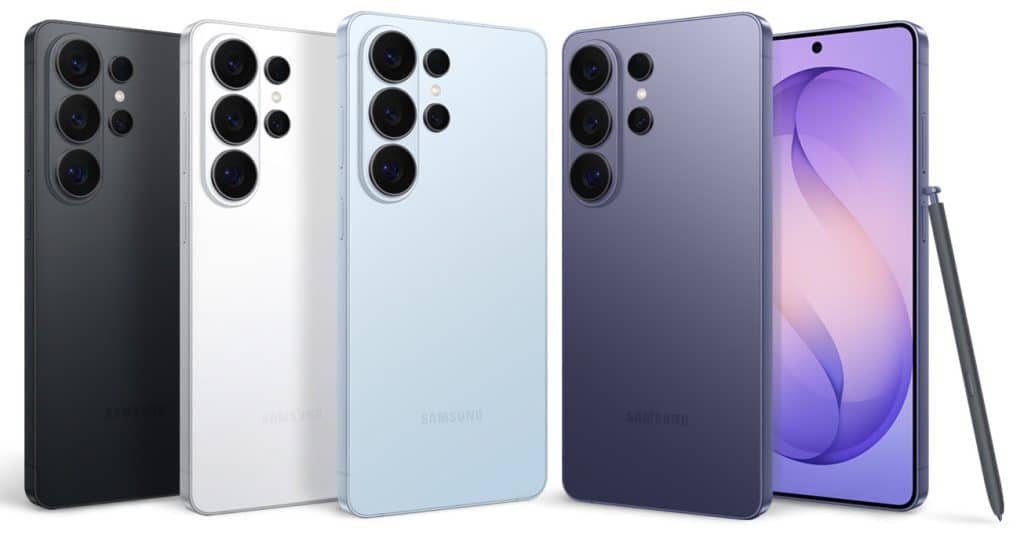
I recently discovered a practical application for the Samsung Galaxy S26 Ultra’s Privacy Display feature that seamlessly integrates into my workflow. While editing videos during flights, I often feel uneasy about revealing sensitive content to strangers nearby. The Privacy Display has proven to be an essential tool, allowing me to work discreetly without the fear of prying eyes. This innovative feature not only enhances my editing experience but also underscores the device’s commitment to user privacy.
Testing the Privacy Display on a Flight
During a recent flight from Delhi to Jaipur, I put the Privacy Display of the Galaxy S26 Ultra to the test while editing a video from the Xiaomi 17 briefing. Sitting by the window, I asked the passenger in the middle seat to hold my phone and browse through it as I attempted to view the screen from an angle. To my surprise, I could not see anything, confirming the effectiveness of the Privacy Display.
Next, I handed the device to the passenger in front of me, who was seated slightly farther away. Although I could faintly detect some movement on the screen, it required significant effort to discern any details. In a typical scenario, most people would likely abandon their attempts to peek. This feature genuinely safeguards your privacy, making it invaluable for anyone who wants to keep their work confidential, especially when dealing with unreleased technology.
Comfort and Design of the Galaxy S26 Ultra
The Galaxy S26 Ultra is designed for comfort, fitting well in the hand and featuring a more rounded shape than its predecessor. Weighing 214 grams, it is slightly lighter than the Galaxy S25 Ultra, which weighed 218 grams. This improved weight distribution ensures that the device does not feel cumbersome, even with its large 6.9-inch display.
The new Cobalt Violet color option adds a refreshing touch, providing an appealing alternative to traditional black or white models. After using the Galaxy S26 Ultra for just over two days, I found its battery life to be impressive. The device houses a 5,000mAh battery, which, combined with strong optimization, allows for extended use. After charging it to 100% and using it for about 30 minutes before bed, I woke up to find it at 89%. Even after a full day of video watching and editing, I still had around 47% battery remaining.
Performance and Features of the Galaxy S26 Ultra
The performance of the Galaxy S26 Ultra has been consistently smooth, with One UI 8.5 operating without any noticeable bugs. The device includes various AI features, such as Note Assist and Creative Studio, enhancing the overall user experience. One feature that stands out is Now Nudge, which shows promise, although I am still exploring its full potential.
The camera system on the Galaxy S26 Ultra has also impressed me, particularly with the new LUT preview feature that allows users to shoot in various styles, including Standard and Blockbuster. This creative addition elevates video recording, making the output feel more professional. However, I did notice some areas for improvement, such as the slightly mushy feel of the power and volume buttons, which could benefit from a more tactile design.
Overall Impressions of the Galaxy S26 Ultra
While the Galaxy S26 Ultra maintains a design similar to the Galaxy S26 and S26 Plus, it still feels like a solid flagship device. The shift from titanium to aluminum and the retention of a largely similar camera setup may raise questions, especially as competitors push the boundaries of smartphone technology. Nevertheless, the Galaxy S26 Ultra stands out as a refined product, built on the foundation of previous generations.
Observer Voice is the one stop site for National, International news, Sports, Editor’s Choice, Art/culture contents, Quotes and much more. We also cover historical contents. Historical contents includes World History, Indian History, and what happened today. The website also covers Entertainment across the India and World.
Follow Us on Twitter, Instagram, Facebook, & LinkedIn

