

Trade Assistant Robot and Other Prop Firm Capital Protection Tools

Strict rules, drawdown restrictions, daily loss limits, and the constant threat of account disqualification if guidelines are breached are some of the challenges of using Prop Firms. For many, the greatest challenge is not the strategy itself, but capital protection and discipline.
This is where the Trade Assistant Robot enters the picture.
Released in September 2025 for both MT4 and MT5, it was designed by TradingFinder for traders working with firms like FundingPips, FunderPro, FTMO, and The 5%ers.
With over seven dedicated setting tabs, features like dynamic trailing stops, break-even points, partial close functions, and news filters, it creates a structured, rule-based environment where traders can focus on execution while staying compliant.
Here are the download links:
Still, the Trade Assistant Robot is not the only option available. There are other tools that also help traders protect their capital under strict prop firm rules.
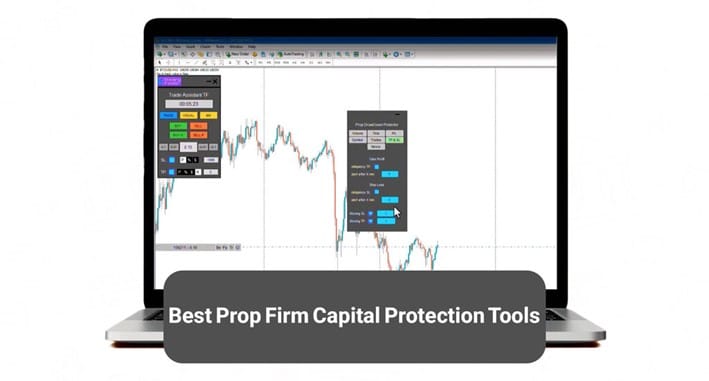
Alt: Best Prop Firm Capital Protection Tools
Caption: An introduction to Prop Firm Capital Protection Expert and other similar tools
Introducing the Prop Firm Capital Protection Expert
The Prop Firm Capital Protection Expert is not an auto-trading robot that replaces human judgment. Instead, it is a Trade Assistant Robot built to create a safe, rule-based environment for traders.
It integrates risk management, capital allocation, and trade execution frameworks directly into MT5 or MT4, ensuring that traders operate with precision and discipline.
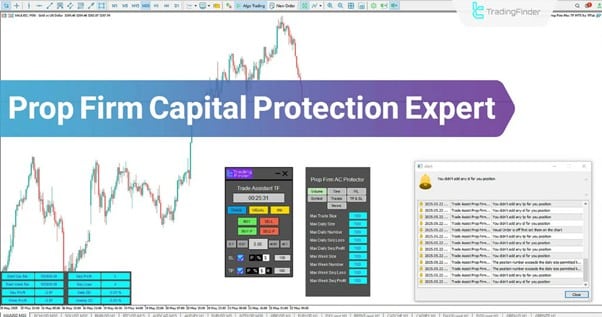
Alt: Prop Firm Capital Protection expert on MT5 and MT4
Caption: The Prop Firm Capital Protection expert is available for MetaTrader 5 and MetaTrader 4
Key highlights include:
- Multi-symbol management for diverse trading portfolios
- Break-Even and Trailing-Stop functions for active risk control
- Instant and Pending order execution directly on the chart
- Seven configuration tabs to personalize trading behavior
This tool is designed to synchronize a trader’s psychology, strategy, and technical execution into one streamlined workflow.
What is Equity Protection EA?
It is a lightweight risk-control EA designed specifically for equity monitoring and drawdown prevention. Its strength lies in simplicity.
Key Features:
- Daily and weekly equity stop-outs
- Automatic trade suspension after limits are hit
- Works on both MT4 and MT5
- Minimal setup required, easy for beginners
- Focused purely on capital protection without extra trade-assist features
Introducing MQL5 Account Protector Script
This piece of software is a customizable script from the MQL5 marketplace for traders who want flexibility in designing their own protections.
Key Features:
- Account-wide stop-loss and equity caps
- Customizable daily/weekly/monthly risk controls
- Trade blocking when defined thresholds are reached
- Works with most brokers across MT4 and MT5
- Can be extended or modified with coding knowledge
What is Guardian Angel Risk Manager?
This one is a professional EA used by some prop firm traders who prefer stricter discipline with a built-in monitoring system.
Key Points:
- Monitors floating equity and margin in real time;
- Enforces maximum drawdown and profit targets;
- Sends alerts (email/Telegram) when limits are close;
- Trade limits by symbol, session, or lot size;
- Can automatically close trades when risk rules are breached.
Who Is the Prop Firm Capital Protection Expert Designed For?
The Trade Assistant Robot has been built with four main trader profiles in mind.
Prop Firm Traders
For traders funded by prop firms, rules are non-negotiable. Even minor violations can result in account suspension. The Expert includes:
- Daily/weekly profit and loss caps
- Strict drawdown controls
- Trade volume limitations
- Symbol and time management
These safeguards ensure traders remain compliant while still maximizing opportunities.
Scalpers
Scalpers need fast execution and tight control. The Expert offers:
- Candle timer for precision
- Instant order placement
- Partial close features
- Dynamic trailing stops
This combination allows scalpers to operate quickly without sacrificing safety.
Traders with Custom Strategies
From ICT to Smart Money Concepts to Price Action, the Expert allows full customization of entry size, stop loss, take profit, and execution rules. This flexibility ensures strategies are executed consistently, reducing emotional bias.
High-Risk Traders
For those who struggle with FOMO, revenge trading, or over-leverage, the Expert enforces discipline:
- Trade limits by count, volume, and time;
- Auto-disable after hitting loss/profit caps;
- Built-in protections against consecutive losses.
In short, it transforms reckless habits into structured trading.
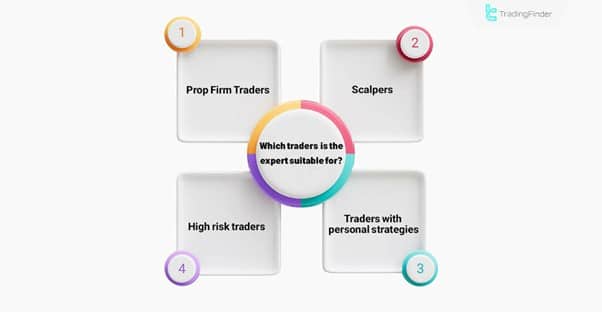
Alt: Prop Firm Capital Protection Trader types
Caption: The Prop Firm Capital Protection is suitable for 4 types of traders
Key Features of the Trade Assistant Robot
Developed by TradingFinder, the Prop Firm Capital Protection Expert is about three things: fast execution, intentional decision-making, and discipline.
Compliance with Prop Firm Rules
This robot automates compliance by cutting off trades or adjusting positions before limits are breached:
- Drawdown caps: Both daily and account-wide;
- Trade suspension Once loss/profit limits are reached;
- News protection: Blocks entries around major announcements;
- Position sizing automation: Risk-based calculation per trade.
Risk and Capital Management
Capital preservation becomes automated rather than left to human reaction, thanks to these features:
- Break-Even and Partial Close functions
- Stepped exit strategies
- Dynamic trailing stop mechanisms
Emotional Control
Emotions remain the biggest reason traders fail. The robot ensures traders stick to their strategies by locking in profits, cutting losses early, and blocking revenge trades.
Execution Enhancements
The built-in candle timer ensures perfect timing, while news blocking prevents trades from opening during high-impact events that could lead to volatility spikes.
Multi‑Symbol Support
The robot is not limited to a single pair or asset. Traders can use it across multiple Forex pairs, indices, or commodities to manage risk consistently.
Together, these features ensure traders enter with intention, not impulse.
Structure of the Expert Panel and Tabs in the Trade Assistant Robot
One of the robot’s most impressive design features is its 11 structured panels, which provide real-time monitoring and control. These are grouped into 7 intuitive tabs, making navigation seamless.
- Trade Tab: Execute Buy/Sell, Pending Buy/Sell, set SL/TP in points, %, or dollars;
- Visual Tab: Place pending orders visually, review risk/reward, and confirm order type;
- Money Management Tab (MM): Break Even, Trailing Stop, group commands, account protector;
- Account Protector Panel (AP): Seven-tab risk control system, overtrading prevention, drawdown limits;
- Volume Tab: Control trade size, number of trades, daily/weekly caps, sequence profit/loss;
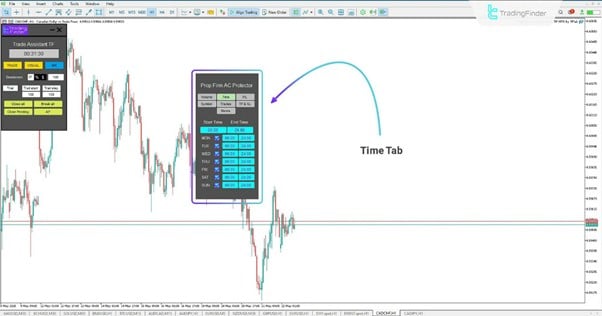
- Time Tab: Define trading hours by day; avoid overnight/low-volatility periods;
Alt: Prop Firm Capital Protection Expert time tab
Caption: Set specific trading hours using the time tab in Prop Firm Capital Protection Expert
- Profit/Loss Limits Tab: Set daily/weekly max profit/loss in %, $, or pips;
- Symbols Tab: Limit trading to approved instruments, avoid distractions;
- Trades Tab: Review floating P/L, daily/weekly performance, sequences;
- TP & SL Tab: Enforce mandatory stop loss/take profit, restrict changes;
- News Tab: Display and filter economic events, set alerts before/after releases.
This modular design allows traders to tailor every detail of their approach.
Practical Trade Example in Using Trade Assistant Robot
On the 15-minute chart of the AUD/CAD currency pair, a Buy position has been executed using the Prop Firm Capital Protection Expert.
This Expert Advisor allows traders to define trade entry volume (Lot Size) and Stop Loss based on three common and practical methods:
- By Points
- As a percentage of account balance (Percent Balance)
- Or by specifying a fixed dollar amount as fixed risk (Fixed Money Risk)
Alt: Prop Firm Capital Protection Expert buy trade
Caption: Buy trade with the Prop Firm Capital Protection Expert
Installation, Activation, and Licensing of Trade Assistant Robot
Getting started with the Trade Assistant Robot is straightforward:
#1 Download and install on MT5 or MT4
Download the trade assistant robot using the links provided above, then follow the standard EA installation guide, place files in the Experts folder, and restart the platform.
#2 Enable Settings
From the top menu in MetaTrader 5 or MetaTrader 4, find your way to “Tools”, then “Options”.
Now, navigate to the “Expert Advisors” tab.
In this tab, make sure to enable these settings:
- Allow DLL imports
- Allow automated trading
#3 Request License
After launching the tool, contact support via website, Telegram, or WhatsApp. A license code will be issued.
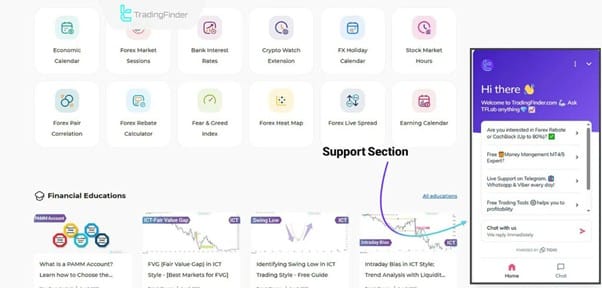
Alt: Request license from TradingFinder
Caption: Get a license code from the TradingFinder support team
#4 Enter License
Insert the code in the “Your License” field of the Expert panel to activate.
Once complete, the robot is fully functional.
Conclusion
The Prop Firm Capital Protection Expert is more than just another trade assistant robot. It is a comprehensive framework for disciplined trading, designed to help traders meet the strict standards of prop firms while improving their personal consistency.
By combining advanced features such as multi-symbol management, dynamic trailing stops, visual pending orders, and automated profit/loss limits, this Expert Advisor bridges the gap between human strategy and machine precision.
For professional traders, the ability to safeguard capital and maintain psychological stability is priceless. With the Prop Firm Capital Protection Expert, traders gain not only a tool but also a structured environment where success is sustainable, rules are respected, and performance can flourish.
In a market where every decision counts, this Trade Assistant Robot ensures those decisions are executed with discipline, accuracy, and long-term capital protection.
Frequently Asked Questions
- What is the main purpose of the Trade Assistant Robot?
The Trade Assistant Robot is designed to protect prop firm capital while helping traders grow accounts sustainably. It provides tools for risk management, compliance, and emotional control rather than placing trades blindly.
- Can the Trade Assistant Robot be used outside of prop firms?
Yes. While it was built for prop firm capital protection, it is also suitable for scalpers, strategy-driven traders, and high-risk traders who want precise risk management and execution control.
- Does the Trade Assistant Robot guarantee profitability?
No trading tool can guarantee profits. The Trade Assistant Robot enhances discipline, risk control, and compliance, giving traders a higher chance of long-term success, but results still depend on the trader’s strategy and market conditions.
Observer Voice is the one stop site for National, International news, Sports, Editor’s Choice, Art/culture contents, Quotes and much more. We also cover historical contents. Historical contents includes World History, Indian History, and what happened today. The website also covers Entertainment across the India and World.

